5 Ways to Get More Clicks From Your Bio Link
Your bio link is the most clicked link in your entire online presence. Here are 5 proven, no-fluff ways to dramatically increase clicks — without changing your content, your audience, or your platform.
If you spend any time on Instagram, TikTok, or LinkedIn, you already know the truth: the link in your bio is the single most valuable URL in your entire online presence. It is the one place every casual scroller, every new follower, every podcast listener, and every press mention eventually points to. And yet most people treat it like an afterthought — a generic Linktree, a half-broken portfolio, or worse, no link at all.
The good news: small changes to your bio link page produce wildly disproportionate results. You do not need a bigger audience or a new platform. You need to remove friction, lead with the right offer, and make the page feel alive. Here are the five highest-leverage moves we see actually move the needle.
Most pages lose clicks not because the audience is wrong — but because the page is slow, generic, or asks the visitor to think too hard. Fix those three things and clicks compound.
1. Lead with one bold, specific CTA
The biggest mistake people make is treating the bio link like a sitemap — a long list of every page they have ever made. Visitors freeze. They scroll. They leave. The page that converts has one obvious primary action up top: 'Book a free intro call', 'Get the free guide', 'Shop the new drop'. Everything else lives below.
- Use a verb — Book, Get, Watch, Shop, Join, Download
- Be specific — '15-min discovery call' beats 'Contact me'
- Style the top button differently so it visually wins
- Match the CTA to the post that drove the visit
2. Make it instantly clear who you are
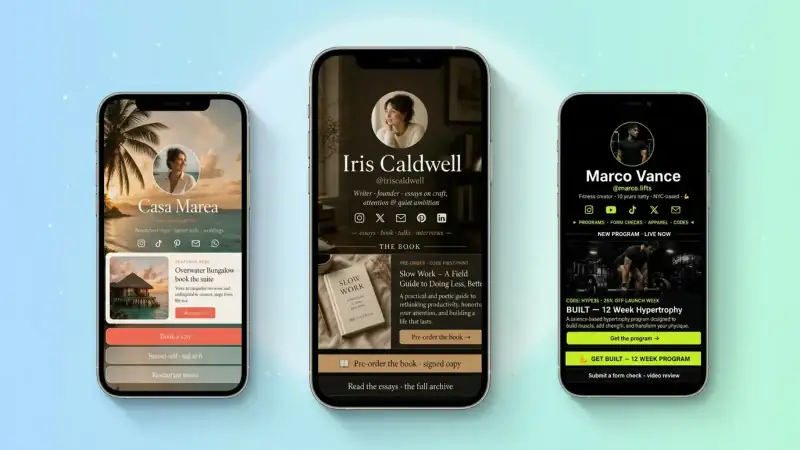
Visitors land on your bio link with one second of attention. If they cannot tell — at a glance — that they are in the right place, they bounce. A clean photo, your name, and one sharp line about what you do removes that doubt. You are not writing a bio for your About page. You are writing a billboard.
Your bio is not a resume. It is the answer to one question: 'Should I tap the next thing or close this tab?'
3. Match the link to the content people just watched
If a Reel about your sourdough starter just popped, your top link should say 'Get my free starter guide' — not link to your homepage. The visitor is in a very specific moment. Honor it. On TinyBio you can drag a block to the top in five seconds, so you can keep your page in sync with whatever just hit the algorithm.
Pin a fresh top link every time you post something that performs. A 30-second swap can double click-through on the day a post takes off.
4. Make the page load in under two seconds
Speed is the silent killer. A 3-second load time loses 32% of mobile visitors before the page even appears. Most legacy bio link tools are bloated with tracking scripts, ad pixels, and slow CDNs. If your link page takes longer to load than the next TikTok, your audience never sees it.
- Compress images before you upload — 2 MB photos are not your friend
- Limit special effects, autoplay videos, and embedded scripts above the fold
- Use a tool that serves from a fast CDN by default (TinyBio is built on one)
- Test your link from a real phone on a real cellular network — not your desktop wifi
5. Capture the visit, do not just spend it
Every click on your bio link is a tiny moment of intent. If the visitor just clicks through and leaves, you spent the click. If they leave their email, sign your contact form, or save your contact card, you captured it. The first turns into a stat. The second turns into a customer.
- 1Add an email signup block with a real reason ('Get my weekly recipes')
- 2Use a contact form for service businesses — direct DMs do not scale
- 3Offer a free download in exchange for the email — a guide, a checklist, a theme
- 4Connect the captures to whatever tool you already use to follow up
Your 10-minute audit
Open your bio link right now and check:
- 1Is there ONE clearly dominant top button?
- 2Can a stranger tell who you are in under 2 seconds?
- 3Does the top link match what you posted this week?
- 4Does the page load in under 2 seconds on cellular?
- 5Is there at least one block that captures an email or a contact?
If you said 'no' to even one of those, you have an obvious win waiting. Fix the leaks, swap to a fast page, and check your click-through rate in seven days.
Build a beautiful, lightning-fast bio link page on TinyBio in under 2 minutes. Free, no credit card, drag-and-drop blocks, real analytics built in.
Build a bio link page that converts
Free, beautiful, fast. Drag, drop, share — your audience does the rest.
Create your TinyBio