How to Optimize Your Instagram Bio for More Clicks
Your Instagram bio has 150 characters and one link to convert scrollers into clicks. Here's exactly how to write it, structure it, and design the page it points to so more people actually tap through.
Your Instagram bio is the most underrated piece of marketing copy you own. People land on your profile in under a second, scan it for under three, and decide whether you're worth tapping. Get those 150 characters and one link wrong and the algorithm's hard work — every reel, every story, every post — leaks straight out the bottom of the funnel.
The good news: optimizing your bio is one of the highest-leverage things you can do all month. You change it once, and every visitor from now until forever sees the upgraded version. Below is the exact playbook we use with creators on TinyBio to turn casual profile views into real clicks.
1. Lead with what you do, not who you are
The single biggest mistake we see is bios that read like a journal entry: "Coffee lover ☕ • Dog mom 🐶 • Just trying my best ✨". That's lovely. It tells a stranger nothing about why they should follow you, click your link, or trust you with their email address.
Instead, lead with the outcome you create for someone else. "I help busy founders write LinkedIn posts that don't sound like LinkedIn posts." "Showing parents how to actually enjoy weekends in Lisbon." "Daily 60-second workouts you can do in pyjamas." The reader instantly understands the value, the audience, and the format — three things your aesthetic alone can't communicate.
2. Use the name field as a second SEO slot
Instagram's internal search indexes both your @handle and your Name field — but not your bio text. That makes the Name field one of the most valuable 30 characters on the entire platform, and most creators waste it by repeating their handle.
Use your Name field for the keywords your ideal follower is actually searching. A wedding photographer in Austin should use "Sara | Austin Wedding Photographer". A vegan baker should use "Maya · Vegan Baking Recipes". Suddenly your profile starts showing up in the search results that matter, even before you've posted that day.
Open Instagram in incognito, search the keyword you'd want to be found for, and see if you appear. If you don't, your Name field is probably the reason.
3. Write the bio like a landing page, not a haiku
A great bio has three lines and they each do a job:
- 1Line 1 — The promise. What outcome do you create, for whom?
- 2Line 2 — The proof or personality. One credibility marker ("As seen in Vogue", "500k recipes downloaded") or one line of voice that makes you feel human.
- 3Line 3 — The call to action. Tell people exactly what to do next and why. "👇 Free 5-day TikTok plan" beats "Link below 🔗" every single time.
Notice the CTA isn't "Click my link in bio". It's a specific, valuable thing they get when they click. People don't click links — they claim things.
4. Use line breaks and emoji like punctuation
Walls of text don't get read. Insert a real line break between each of the three lines above (paste them in from your Notes app — Instagram will preserve the breaks), and use one emoji per line as a visual anchor. Emoji aren't decoration; they're the icons of mobile copywriting. A 👇 next to your CTA pulls the eye toward your link button. A 🎧 next to a podcast credit signals what you do without burning a word.
Rule of thumb: if you'd describe your bio as "cute", it probably isn't converting. Aim for "clear".
5. Make the link itself irresistible
Most bios send people to a homepage, a Linktree, or a single product. All three leak clicks. Your link should feel like the natural next step from the bio's promise — and the page itself needs to be fast, on-brand, and obvious.
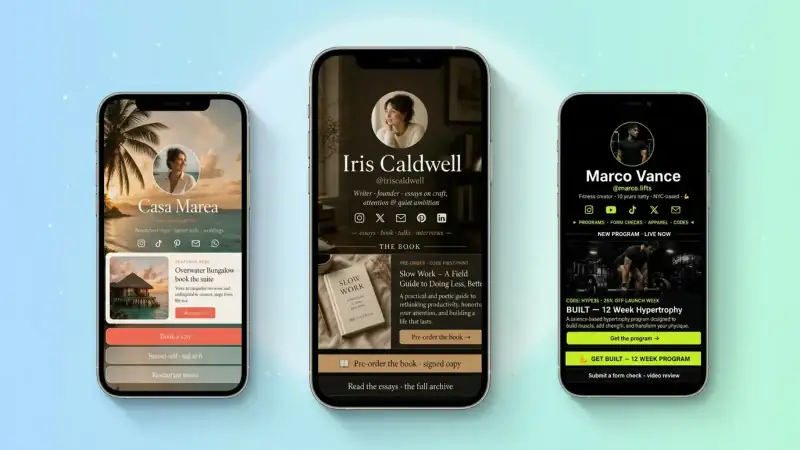
The pages that convert best on TinyBio share four things:
- A photo or avatar that matches the Instagram profile picture (so visitors know they're in the right place)
- One headline that repeats the bio's promise in slightly more detail
- Three to five clearly-prioritised links — newest or most important on top, never a wall of 20
- At least one block that captures something (an email signup, a contact form, a tip jar) so the click isn't just a click — it's a relationship
6. Match the link to the content people just watched
If a Reel goes viral about your sourdough starter, your top link should be "Get my free starter guide" — not your generic shop. The person tapping into your bio is in a very specific moment. Honor it. Even a 30-second swap on the day a post pops can double click-through.
On TinyBio you can drag blocks to reorder in seconds, so it's painless to keep the top link aligned with whatever just hit the algorithm.
7. Track what's actually working
You can't optimize what you can't see. The number of profile visits Instagram shows you is interesting, but the number that actually matters is: of the people who land on your linked page, how many click through to the thing you wanted them to click?
TinyBio shows page views, unique visitors, link clicks, and click-through rate per block — so you stop guessing and start iterating. Try one bio change every Monday. Look at the CTR on Sunday. Keep what wins.
Your 10-minute bio audit
Open your profile right now and check:
- 1Does line 1 say what you do for whom, in plain English?
- 2Does the Name field contain a keyword someone might search for?
- 3Does the last line give a specific reason to tap the link?
- 4When you tap your own link, does the page load in under 2 seconds?
- 5Is the top link the thing you want clicked most this week?
If you answered "no" to even one of those, you have an obvious win waiting. Fix the bio, swap your link page to TinyBio, and check your click rate in seven days. We'll bet a coffee it's higher.
Create your free TinyBio in under two minutes — no credit card, no fluff. Drag your links, drop in a signup block, watch the analytics roll in.
Build a bio link page that converts
Free, beautiful, fast. Drag, drop, share — your audience does the rest.
Create your TinyBio