From 1 Link to 100 Leads: How Smart Creators Use Their Bio Page
One link, 100 leads, every single month — without ads. Here's the exact playbook smart creators use on their bio page to turn casual social scrollers into a steady pipeline of email signups, customers, and brand deals.
Most creators have one link in their bio and zero idea what it's actually doing. It points at a homepage, a shop, or worse — Linktree-by-default. Visitors tap, scan, and bounce. The link is technically working. Nothing else is.
The smartest creators treat that single link very differently. They run it like a tiny, ruthlessly optimized lead-generation machine. Same audience, same content, same number of profile visits — but instead of a vague "hope you click" energy, every single block on their page is engineered to capture an email, book a call, or close a sale. The result, repeatedly: 100+ qualified leads a month from a profile they were already running for free.
This is the playbook. Steal it, swap your bio link tonight, and watch your DMs and inbox quietly start filling up.
Why 1 link can become 100 leads (the math)
Let's run the numbers without sugar-coating. A small creator with 8,000 Instagram followers typically gets around 2,500 profile visits a month. Industry-average bio link click-through hovers around 4–6%, so call it 130 link taps. With a generic, unfocused link page, maybe 3% of those take any meaningful action — that's 4 leads.
A focused, well-built bio page routinely converts 25–40% of taps into a real lead (an email, a booked call, a contact form). At 30%, the same 130 taps become 39 leads. Push profile visits up, push CTR up, push conversion up — three small dials — and 100+ leads a month from a single bio link is not just possible, it's the baseline for creators who actually treat it seriously.
Profile visits × link CTR × on-page conversion. Triple any one of them and your monthly leads roughly triple. Triple all three and you've quietly built a real business.
1. Pick one lead goal — and only one
The number one mistake we see: bio pages with twelve unrelated buttons. Newsletter, podcast, shop, booking, free PDF, second account, brand inquiries, tip jar, course, merch — all crammed in with equal weight. The visitor freezes. A confused visitor never converts.
Smart creators pick one primary lead goal per season and make it the unmissable hero block at the top of the page. Are you growing your email list? Top block is a free, specific lead magnet. Selling a course? Top block is the course landing page. Booking 1-on-1 calls? Top block is a calendar link. Everything else moves down or off the page entirely.
2. Use a real lead magnet, not a vague newsletter signup
"Subscribe to my newsletter" converts at maybe 1–3%. "Get my free 7-day TikTok hook calendar" converts at 15–25%. The difference isn't the audience — it's the specificity and the obvious value.
Three lead magnet patterns that consistently outperform a generic signup:
- A short, niche-specific PDF — "30 Notion themes I use weekly", "5 questions to ask before hiring a wedding photographer"
- A mini email course — "My free 5-day course on growing your first 1,000 followers"
- A swipeable resource — "My exact 14-shot Reel hook framework", "My favorite 12 prompts for ChatGPT marketing"
Make the deliverable the headline of the block. "Get my 30 viral hook themes — free PDF" works. "Newsletter" doesn't.
3. Capture the email before you ask for the sale
Cold social traffic is in discovery mode. They might love your content, but they're not ready to buy a $97 course on the first visit. If your only top-of-page CTA is a sale, you lose 95%+ of would-be customers forever.
Smart creators stack the page in lead-temperature order: lead magnet first, low-ticket product second, premium offer third. Email signup gives them a way to follow up free, helpful, and on a channel they own. The course or coaching offer sits below for the warmer traffic that's ready to act today. Both audiences get served, neither gets pushed.
4. Add a contact form for high-intent leads
Some bio link visitors aren't there for content — they want to hire you, partner with you, or pay you. Don't bury that audience under five other blocks.
Add a clearly-labelled, high-intent contact form on its own block: "Coaching inquiries" or "Brand partnerships — pitch me here" or "Book a free 15-minute consult". Keep it short — name, email, one optional field. Every extra field cuts conversion by roughly 10%. The leads who fill out a 3-field form in your TinyBio are infinitely more qualified than the ones who DM "hi" and ghost.
DMs go to a black hole inbox. Form submissions go to your email with their contact info attached, ready to follow up. One is a friction-free booking system. The other is a part-time job.
5. Match your top block to whichever post is popping
Social virality is unpredictable. A two-year-old Reel can pop overnight. When that happens, the worst thing you can do is point a wave of fresh new visitors at a generic homepage or a shop link unrelated to the content they just watched.
Smart creators watch their analytics for spikes. The moment a post moves, they swap the top block on their TinyBio to whatever directly matches that exact piece of content — the matching freebie, the matching product, the matching booking. On TinyBio you can drag a block to the top in seconds. That 30-second tweak on a viral day routinely doubles or triples lead capture from the same traffic.
6. Write your bio above the link to pre-qualify the click
The 150 characters above your link are doing free filtering work for you. Use them to attract the right audience and gently push away the wrong one.
A good bio above the link does three things: it states what you do, who it's for, and what they get if they click. "TikTok growth coach · For B2B founders · Free hook calendar 👇" pre-qualifies every single click. The visitors who tap your link are already warm. Lead quality goes up; junk inquiries go down.
7. Build trust in the first scroll
Strangers from social have no idea if you're legit. A few quiet trust signals near the top of your bio page convert dramatically better than the same page without them.
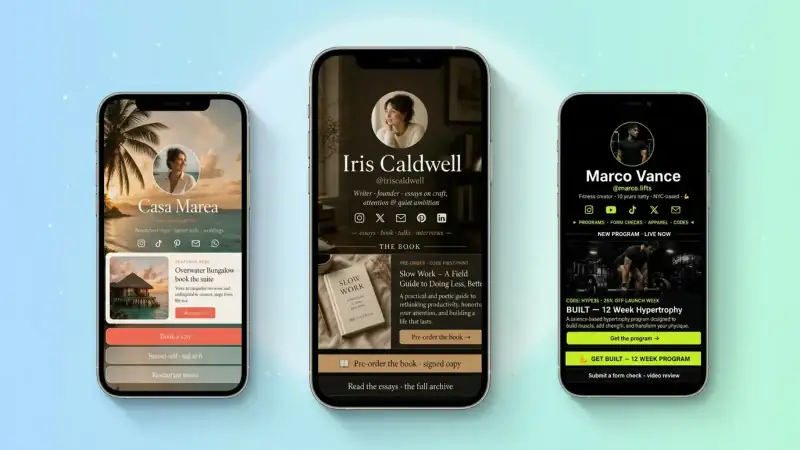
- A real photo of you (not a Bitmoji, not a stock image)
- A short "As featured in" or "Worked with" row with two or three logos — podcasts, publications, brands
- Two or three brief testimonials with first name + city or company
- Any credential that matters in your niche (years in business, certifications, follower count milestones)
Three lines and a photo do more for conversion than a wall of corporate copy ever will.
8. Track CTR per block and rearrange weekly
You can't optimize what you can't see. Most creators have no idea which of their blocks actually drives leads. They guess based on vibes. The ones running real lead-gen machines obsessively check click-through rate per block and rearrange every Sunday.
TinyBio shows page views, unique visitors, and click-through rate per block by default. Run this weekly loop:
- 1Sunday night, look at last week's CTR per block
- 2Move your top performer to the very top
- 3Swap or kill the bottom two blocks
- 4Set one experiment for the new week (a new headline, a new lead magnet, a new offer)
- 5Rinse, repeat
Compounded over a quarter, this single 10-minute weekly habit will outperform any new posting strategy you'd otherwise try.
9. Speed matters more than design
Pretty pages that take 5 seconds to load on mobile lose more leads than ugly pages that load in 1. Google's bounce rate data is brutal, and bio link traffic is overwhelmingly mobile, often on patchy LTE in coffee shops, on subways, in waiting rooms.
TinyBio pages are built to load in under 2 seconds on phones out of the box — lightweight design, optimized images, no third-party tracker bloat, served from edge servers worldwide. If you're using a generic website builder as your bio link, run it through Google's PageSpeed Insights. Anything under 90 on mobile is a quiet leak.
10. Treat your bio link like an A/B test, not a finished product
The best-performing creator bio pages are never "done". They get tweaked weekly. New lead magnet headline? Test it. Lead form moved up? Test it. Different testimonial first? Test it. After three months of small weekly changes, the page is unrecognizably better than where it started — and the leads are flowing.
Most creators set up their bio page once, walk away, and wonder why it doesn't convert. The ones building real audiences run their page like a product. That mindset shift is most of the difference between 4 leads a month and 100.
Your 100-leads-a-month checklist
Open your bio link page right now and check:
- 1Is your top block a single, specific lead goal — not a generic "shop" or "all my links"?
- 2Is your lead magnet a real, named deliverable — not just "newsletter"?
- 3Is there a contact form for high-intent leads with 3 fields max?
- 4Does the bio above the link state what you do, who for, and what they get?
- 5Are there three trust signals (real photo, testimonials, logos) above the fold?
- 6Do you know your CTR per block from last week?
- 7Does the page load in under 2 seconds on a real phone, not just wifi?
If you said "no" to even three of those, you have an obvious upgrade waiting — and it's almost certainly worth more in monthly leads than any ad spend you'd otherwise put behind your content. Build a focused, fast, lead-gen TinyBio page in two minutes, swap your social bio link tonight, and start counting the inquiries.
Free, mobile-fast, no credit card. Drag in your lead magnet, contact form, and trust signals — and turn every Instagram, TikTok, and Threads visit into a real lead by the end of the week.
Build a bio link page that converts
Free, beautiful, fast. Drag, drop, share — your audience does the rest.
Create your TinyBio