How Small Businesses Can Use a Link in Bio to Get Leads
A link in bio isn't just for influencers — it's the fastest, cheapest lead-generation tool a small business can set up. Here's how local shops, service businesses, and solo founders are turning Instagram and TikTok visits into booked calls, quotes, and paying customers.
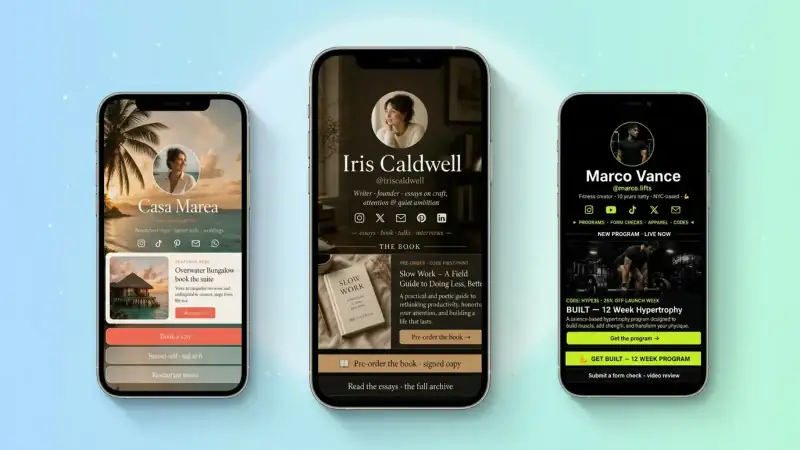
If you run a small business in 2026, your customers are finding you on Instagram, TikTok, and Google before they ever set foot in your store or pick up the phone. They tap your profile, glance at your bio, and decide in seconds whether you're worth contacting. The single piece of internet real estate doing all of that work — for free, every day — is your link in bio.
And yet most small businesses point that link at a homepage built five years ago, a dusty Facebook page, or worse: nothing at all. That's a lead-generation hole the size of every social follower you've ever earned. Below is the playbook small businesses on TinyBio use to turn that one link into a steady stream of leads, bookings, and quotes.
Why a link in bio beats your website for lead gen
Your homepage was built to tell your whole story. A bio link page is built to do one thing: convert the person who just tapped over from Instagram. It loads instantly on mobile, shows only the things that matter for someone in discovery mode, and removes every friction between "interested" and "contacted you".
For a small business, that focus matters more than anything design-y. A plumber doesn't need a hero video. They need a phone-tap-to-call button, a quote form, and the service area in big text. A bakery needs hours, address, and an order link — not a parallax scroll of artisan flour photography.
Open your business website on your phone right now. Time how long it takes to load and how many taps it takes to contact you. If either is more than 3, your bio link is silently losing leads every day.
1. Decide what "a lead" means for your business
Before you change a single link, write down — literally write down — what a lead is for you. A booked consultation? A submitted quote form? A phone call? A walk-in with a coupon code? You can't optimize a page until you know which action you want a stranger to take.
Service businesses (cleaners, plumbers, photographers, lawyers, coaches) almost always want a contact form submission or a booked call. Local product businesses (cafés, salons, boutiques) want a phone call, directions, or an order. Online businesses want an email signup or a free trial. Pick one primary action — that's the job your top link block exists to do.
2. Put the contact form first, not last
The biggest mistake small businesses make is hiding their contact form behind three taps and a "Contact Us" page. The person on your bio link is already interested — make submitting their info the easiest thing on the page.
Add a contact form block as the very first or second item. Keep it short: name, phone or email, and one optional field for what they need. Every extra field cuts conversion by roughly 10%. "Get a free quote in 24 hours" beats "Send us a message" every time, because it tells the visitor exactly what they get and when.
3. Make calling and directions one tap away
For local businesses, the highest-intent leads are people ready to call or visit right now. Don't make them dig.
- Add a click-to-call link block at the top with your phone number — on mobile it dials with one tap
- Add a map block with your address — taps straight into Apple Maps or Google Maps for directions
- Show your hours clearly so no one calls when you're closed and gives up
- If you have an emergency or rush service, say so right next to the phone number
These three blocks alone — call, directions, hours — convert better for local service businesses than almost anything else you can put on a page.
4. Build trust in three seconds
Small businesses live or die on trust signals. A stranger from Instagram has no idea if you're legit. Your bio link page needs to answer "can I trust these people?" before they even consider contacting you.
Three trust elements that consistently lift lead conversion:
- 1A real photo — your team, your storefront, or your work. Stock photos kill trust faster than they build it.
- 2A short testimonials block with two or three real customer quotes (first name + city is enough)
- 3Any credentials that matter in your industry — license number, years in business, awards, press logos
You don't need a 50-page about section. Three lines and a photo do more than a wall of corporate text ever will.
5. Use the bio above the link to qualify the lead
Your Instagram bio (the 150 characters above your link) is doing free filtering work for you. Use it to attract the right leads and gently push away the wrong ones.
A wedding photographer should say "Wedding photographer · Dallas + travel · Booking 2026 dates". A house cleaner should say "Eco house cleaning · Brooklyn · Weekly + biweekly · From $90". The visitor knows in five seconds whether they're a fit. The ones who tap your link are pre-qualified — they already know roughly what you do, where, and for how much. Lead quality goes up; time wasted on bad-fit inquiries goes down.
6. Capture the leads who aren't ready yet
Most visitors to your bio link aren't ready to book today. If your only option is "submit a quote form", you lose all of them forever. Add a low-commitment way to stay in touch and you'll convert a chunk of those visitors over the next 30, 60, 90 days.
Add an email signup block with a useful, tiny offer: "Get a free home maintenance checklist", "5 questions to ask before hiring a wedding photographer", "Monthly seasonal recipes from our café". The freebie doesn't have to be huge — it has to be relevant. Then send one short, helpful email every week or two. You'll be top of mind when they're finally ready.
Most small business owners obsess over today's leads and ignore the much larger pool of people who'll convert in 60 days. An email list captures that future revenue automatically.
7. Make the page load in under 2 seconds on mobile
Speed is the silent lead killer. Google's data is brutal: bounce rate jumps 32% as page load goes from 1 to 3 seconds, and 90% as it goes from 1 to 5. A slow link page wastes every dollar you spend on social content.
TinyBio pages are built for sub-2-second loads on mobile out of the box: lightweight design, optimized images, no third-party tracker bloat, served from edge servers worldwide. If you're using a generic website as your bio link, run it through PageSpeed Insights right now — anything under 90 on mobile is a leak.
8. Track which links actually become customers
Most small businesses have no idea where their leads are coming from. They guess. The ones growing fastest measure click-through rate per block and ask every new lead one simple question: "How did you hear about us?" Then they double down on whatever wins.
TinyBio shows you page views, unique visitors, and click-through rate per block by default. Once a month, look at the numbers. Move the highest-converting block higher. Kill the bottom one. Test a new offer. That's the entire optimization loop — it works.
Your small business lead-gen checklist
Open your link page right now and check:
- 1Does it load in under 2 seconds on a real phone, not just wifi?
- 2Is the primary lead action (call, form, booking) the first thing visible?
- 3Are your hours, address, and phone number obvious without scrolling?
- 4Do you show at least one testimonial or trust signal?
- 5Is there a low-commitment way (email, freebie) for not-ready visitors to stay in touch?
If you said "no" to even two of those, you have an obvious upgrade waiting — and it's almost certainly worth more in new revenue than any ad spend you'd put behind it. Build a focused, fast, lead-friendly TinyBio page in two minutes, swap your social bio link, and start counting the inquiries.
Free, mobile-fast, no credit card. Drag in a contact form, add your phone number and hours, and start converting Instagram and TikTok visits into real customers today.
Build a bio link page that converts
Free, beautiful, fast. Drag, drop, share — your audience does the rest.
Create your TinyBio